mercoledì 19 giugno 2013

Win A Sigma 18-35mm f/1.8 DC HSM

News image

SIgma UK have teamed up with landscape photographer Lea Tippett and are giving away to one lucky winner a shiny new Sigma 18-35mm f/1.8 DC HSM lens and a two-day photo workshop in Dartmoor National Park. To enter this competition simply email your best landscape photo to competition@sigma-imaging-uk.com along with up to 80 words telling Sigma how you would benefit from a 2 day landscape photography workshop. Closing date for entries is 31st July 2013. The winner will be notified by email/phone by Friday 16th August 2013.  This competition is open to adult UK residents only. The workshop will take place on Saturday 28th and Sunday 29th September 2013 and accommodation and meals on the nights of Friday 27th and Saturday 28th September will be included
Sigma Press Release
Win a Sigma 18-35mm f/1.8 DC HSM and learn how to get the most from it with a weekend’s tuition with Pro landscape photographer Lea Tippett
To celebrate the launch of the Sigma 18-35mm f/1.8 DC HSM lens, we’ve teamed up with Pro landscape photographer Lea Tippett and are giving away to one lucky winner a shiny new Sigma 18-35mm f/1.8 DC HSM lens and a two day photo workshop in Dartmoor National Park. The workshop will include visits to many of the finest photographic locations in the area such as Bowerman's Nose, Postbridge, The Windy Post and Great Staple Tor.
The workshop will take place on Saturday 28th and Sunday 29th September 2013 and accommodation and meals on the nights of Friday 27th and Saturday 28th September will be included. The weekend is designed for you to learn how to get the most out of your new fast aperture zoom lens and to give you some great advice on how to take stunning landscape photos. Lea will take you through the principles of successful landscape photography, basic camera techniques along with advising on composition and making the most of available lighting. The lucky winner will be given their 18-35mm f/1.8 DC HSM lens at the start of the workshop and one of Sigma’s staff members will be on hand to answer any technical questions regarding the lens.
The Sigma 18-35mm f/1.8 DC HSM is the world’s first f/1.8 constant aperture zoom lens for SLRs and is available for Canon, Nikon and Sigma SLR cameras with an APS-C size image sensor. Falling into the Art product line in Sigma’s Global vision campaign, this new lens has been designed with a focus on sophisticated optical performance and tremendous expressive power. With unsurpassed expressive performance, these lenses reach the high standards demanded by photographers with an artistic, creative inclination. For more details on this new lens, visit
To be in with a chance of winning a Sigma 18-35mm f/1.8 DC HSM and weekend’s tuition for you and your partner, simply email us your best landscape photograph along with no more than 80 words telling us how you would benefit from a weekend’s landscape photography tuition with this superb camera.
About Lea Tippett
Lea Tippett has been capturing stunning landscape images for many years and, as a Sigma camera user, is perfectly placed to advise on how to get the most out of Sigma products. Born in Cornwall, he specialises if taking landscape photographs in the south west of England and his knowledge of the area is second to none. He took the leap into digital SLR photography in 2004 when he purchased the Sigma SD9 and found the camera travelled everywhere he did. He now uses the Sigma SD15, SD1 Merrill cameras with a selection of Sigma lenses.
How to enter…
To enter this competition simply email your best landscape photo to competition@sigma-imaging-uk.com along with up to 80 words telling us how you would benefit from a 2 day landscape photography workshop. Ensure your submitted image is between 2 and 3 megabytes in size and saved in JPEG format. Please include with your entry your Name, Phone Number(s) and Postal Address. Sigma Imaging UK Ltd and Lea Tippett will select one winner from the entries and the judges’ decision is final. Closing date for entries is 31st July 2013.
TERMS AND CONDITIONS: The winner will be notified by email/phone by Friday 16th August 2013.  This competition is open to UK residents only. All entrants must be at least 18 years old. Employees of Sigma Imaging (UK) Ltd and their immediate families and agents may not enter. Entries must be received by 31st July 2013. Entries not in accordance with these rules will be disqualified: by entering the competition, competitors will be deemed to have agreed to be bound by these rules. The prize must be taken as offered with no alternative. In the event that the prize cannot be supplied no liability will attach to Sigma Imaging (UK) Ltd. Copyright of all images submitted for this competition remains with the respective entrants. Sigma Imaging (UK) Ltd reserves the right to reproduce any submitted images for its own use in connection to this competition without prior permission from the photographer. Where an image is used, the photographer will be credited. Sigma Imaging (UK) Ltd may choose to showcase any submitted images on this website or on its social media as a means of promoting the competition. All photographs submitted must be the work of the individual who submits them.
Entrants must ensure that photographs have been taken with the permission of the subject (where necessary) and do not infringe the copyright of any third party. It is the responsibility of the winner to make their way at their own expense to the pre-determined meeting point in Dartmoor and the actual date of the tuition is fixed and cannot be changed.

New Tethered Shooting Option with Capture One 7

News image

Phase One and Profoto today announced that photographers can now link their Profoto studio light to the aperture or ISO settings of their DSLR or medium format camera system. While shooting tethered in Capture One Pro, any changes to the aperture on the camera will cause the light intensity of the studio light to automatically compensate an equivalent f-stop. For example, if the photographer switches from f/8 to f/5.6, the light will drop one f-stop, so that the image is not overexposed. The solution lets photographers easily define which groups of lights should be included in the linking. The Profoto Studio plugin download is available at the website below.
Website: Profoto
Profoto Press Release
Phase One and Profoto Deliver Camera & Lighting Control Breakthrough for Professional Photographers
A Powerful New Tethered Shooting Option with Capture One Pro/DB 7
COPENHAGEN and STOCKHOLM, June 17, 2013 -- Phase One and Profoto today announced that their technical collaboration has produced an unprecedented integration of simultaneous image capture and light control.
Now photographers can link their Profoto studio light to the aperture or ISO settings of their DSLR or medium format camera system. While shooting tethered in Capture One Pro, any changes to the aperture on the camera will cause the light intensity of the studio light to automatically compensate an equivalent f-stop. For example, if the photographer switches from f/8 to f/5.6, the light will drop one f-stop, so that the image is not overexposed. The solution lets photographers easily define which groups of lights should be included in the linking, making it a powerful and flexible work tool.
“Capture One Pro was designed to satisfy the needs of professional photographers,” said Henrik O. Håkonsson, CEO & President, Phase One. “Our collaboration with Profoto and the success of our capture and lighting integrations offer unprecedented lighting control during capture. This solution is especially great for portrait photographers who want to vary their depth of field; they can just turn the aperture dial and the light intensity will follow to ensure the right exposure.”
Anders Hedebark, CEO, Profoto added: “Since our initial capture and lighting integration projects with Phase One, photographers have encouraged us to do more in this area. Capture One Pro is a great platform from which to empower our customers with better tools to manage their professional light gear.”
Two years ago, the companies announced their first image capture and light control integration solution available in Capture One Pro 6. It provided remote access for wireless control of Profoto lighting equipment from within the Capture One application.
Availability and Pricing
The new image capture and lighting integration solution is available now for Mac OS. It requires Capture One Pro 7.1.2 or Capture One DB (digital back) 7.1.2 or later and a Profoto Studio plugin for Capture One. The Capture One software is available from Phase One at http://www.phaseone.com/software or from one of its authorized dealers. The Profoto Studio plugin download is available at http://www.profoto.com/capture-one
. The solution works with all Profoto lights with built-in Air Remote Control. For a list of compatible cameras please refer to:
http://www.phaseone.com/camerasupport
About Profoto
Profoto is a Swedish company manufacturing flash equipment for the professional photo market. Established in 1968, Profoto is one of the leading flash manufacturers in the world, and counts among its customers a great many of the leading photographers and rental houses. Profoto is headquartered in Sundbyberg, north of Stockholm. For more information visit:

http://www.profoto.com; or contact the team at:
Twitter at https://twitter.com/Profoto
Facebook at http://www.facebook.com/profoto Blog at:
http://www.profoto.com/blog
About Phase One
Phase One is the world’s leader in open-platform, high-end camera systems and solutions. Phase One cameras, digital backs and lenses are designed to deliver superior quality image capture and investment value. Phase One’s Capture One and Media Pro software help streamline capture and post-production processes for both medium format and DSLR cameras. Phase One products are known for their quality, flexibility and speed enabling pro photographers shooting in a wide range of formats to achieve their creative visions without compromise.

New Line of Pro Softboxes by Westcott

News image

Westcott`s new line of Pro softboxes are designed for use with hot lights, strobes or LEDs. Features include tent-style vents, double-layer heat shield diffusion fabrics with virtually no colour shift and sprung steel rods. The Pro softboxes come in three sizes, 16"x22" (£120), 24"x32" (£155) and 36"x48" (£200).
Press Release
JP DISTRIBUTION IS EXCITED TO ANNOUNCE THE INTRODUCTION OF A NEW LINE OF PRO SOFTBOXES BY WESTCOTT
Westcott`s new line of PRO softboxes offer the same amazing high quality found on the 1000w softboxes for a fraction of the cost. For use with hot lights, strobes or LED`s these softboxes are a perfect fit for any photographer or videographer. Westcott boxes feature only the finest quality fabrics and are backed by a 5 year warranty. Diffusion materials are among the purest on the market meaning virtually no colour shift.
FEATURES INCLUDE:
• 5-year warranty
• Double layer heat shield fabric
• Sprung Steel Rods
• Tent Style Vents
• Up to 500 watts
RANGE
16" x 22" Pro Softbox
JP Code: 860470
SRP: £120 inc VAT
24" x 32" Pro Softbox
JP Code: 860471
SRP: £155 inc VAT
36" x 48" Pro Softbox
JP Code: 860472
SRP: £200 inc VAT
ABOUT WESTCOTT

With roots dating back to 1899, the F.J. Westcott Co. is currently a leading innovator of photo-video lighting solutions for professionals and enthusiasts. We proudly team up with top industry pros to educate and inspire our customers throughout the globe through live shootout events, seminars and more.

Datacolor Partners with onOne Software

News image

Datacolor has teamed up with onOne Software for a three-month promotional offer. Beginning today and running through September, purchasers of a Datacolor Spyder4ELITE monitor calibration device will receive a free download of onOne Perfect Effects 4 Premium Edition software. For more information and for additional details about the promotion visit the website below.
Website: Datacolor
Datacolor Press Release
Datacolor Partners with onOne Software to Create the Perfect Color and Editing Solution
Three month promotion bundles Datacolor Spyder4ELITE™ with onOne Perfect Effects 4
Lawrenceville, NJ – June 18, 2013 –– Datacolor® (http://www.datacolor.com), a global leader in color management solutions, today announces a three month promotional offer with partner onOne Software, Inc., a leading developer of innovative and timesaving software solutions that make digital photography easier, faster and better. Beginning June 18 and running through September, purchasers of a Datacolor Spyder4ELITE™ monitor calibration device will receive a free download of onOne Perfect Effects 4 Premium Edition software.

Photographers can take advantage of this promotional offer, valued at $99.95, and enjoy the benefits of a properly color-calibrated screen using the Spyder4ELITE, an essential starting-point when photo editing. From landscape and nature to wedding and portraits, Perfect Effects 4 offers a robust library of photographic effects to add professional looks to photos instantly – including HDR and vintage effects. Combining the color calibration technology of the Spyder4ELITE and the creative effects of Perfect Effects 4 software will enable professional photographers to achieve true-to-life, accurate color displays while also creating images with impact.

"Proper color management is a key step throughout the digital workflow process in creating great looking images with Perfect Effects 4,” said Dan Harlacher, senior product manager, onOne Software. “The Spyder4ELITE offers a straightforward and affordable way for professionals to calibrate displays."

“We are pleased to offer Spyder4ELITE, the leading display calibration solution for imaging professionals, in a combination package with Perfect Effects 4 Premium from the leading manufacturer of photo enhancement tools," said Thomas Kunz, imaging market manager for Datacolor. "For every serious photographer, a perfectly color calibrated monitor is a must-have foundation for any creative work. With this promotion, photographers will receive a premier bundle package that will give them the highest color consistency and an easy, fast, and powerful way to creatively edit their images with impact.” 

In addition to the promotional offer, Datacolor and onOne Software will be offering a free webinar today at 2:00 p.m. EDT/20:00 MEST titled “Focus Control: Before, During and After the Shot.” The webinar will explore tools and techniques for controlled focus and enhancing or limiting depth of field. Color management issues as they relate to photo editing will also be discussed during this one hour webinar. To register in advance, visit spyder.datacolor.com/freewebinars.

For more information and for additional details about the promotion, visit http://spyder.datacolor.com/portfolio-view/spyder4elite

About Datacolor

Datacolor is a global leader in color management solutions and color communication technology. The world's leading brands, manufacturers, creative professionals and consumers have been choosing Datacolor's innovative technology and solutions to consistently achieve the right color for over 40 years.

A Swiss held company, Datacolor's global presence encompasses a sales, service and support network serving customers in more than 65 countries throughout Europe, the Americas and Asia, along with 14 worldwide operation and production facilities. Industries served include apparel and textile, paint and coatings, automotive, plastics, photography, home theatre and others. For more information about Datacolor and its products or services, visit http://www.datacolor.com

Arca-Swiss monoball Z1g+

News image

Arca-Swiss has launched its new Monoball Z1g+ tripod head. Improving on the well-known Monoball Z1g, the Arca-Swiss Z1g+ boasts a newly engeneered Motion Related Gravity Control (MRGC) mechanism, while being 30% smaller and lighter than its predecessor. Described as "a higly sophisticated device designed to simultanously give a strong hold while allowing smooth and accurate positioning of the camera," the Arca-Swiss Monoball Z1g is priced at $749.
Press Release
monoball Z1g+

The new monoball Z1g+ with a PLUS+ of outstanding virtues. ARCA-SWISS has improved all aspects of the well-known Monoball Z1g – packing even more features into the lighter and tighter Monoball Z1g+. The new ARCA SWISS tripod head Z1g+ excells with well balanced holding and moving properties. Safe holding support and subtle positioning are the crucial functions of a tripod head, according to ARCA SWISS.

Its newly engeneered Motion Related Gravity Control (MRGC) a variable and bi-directional drag, is independently operative on both axes and stabilized in all directions – and with horizontal movement, the resulting friction remains constant, whereas with vertical movements the friction increases progressively.
Intelligent engeneering and precise manufacturing guarantee for a well distributed radial chucking.

With this in mind, the new monobll Z1g+ is, of course, not another primitive loosen/tighten clamp but a higly sophisticated device designed to simultanously give a strong hold while allowing smooth and accurate positioning of the camera.

The new monoball Z1g+ comes with an additional panorama above the ball which allows a perfectly horizontal panning, regardsless of how the tripod has been placed.

The Z1g+ is 30% smaller and lighter than its Z1g predecessor and weighs in at 2.1 lbs. (960 grams).

Price: $749

Intelligent Image Solutions Releases Piccure

News image

Intelligent Imaging Solutions has released piccure, billed as "the first fully automated software tool to correct camera shake." As a plug-in for Adobe Photoshop (CS4 and above) and Photoshop Elements (version 7 or later), piccure automatically detects and corrects image blur resulting from involuntary camera movement. The software runs locally, on a standard computer, and users do not need to worry about their privacy: piccure does not upload any images into the cloud to be processed by some company’s servers, the developers say. The Photoshop plug-in is available for $99, while a simpler version designed for Elements (without multiprocessor support) can be purchased for $49.
Intelligent Imaging Solutions Press Release
Intelligent Imaging Solutions releases final version of “piccure” – an easy to use plugin to reduce camera shake in images
Tübingen, June 17th 2013 -­Intelligent Imaging Solutions just announced the release of piccure – the first fully automated software tool to correct camera shake.
As a plugin for Adobe® Photoshop® (CS4 and above) and Adobe® Photoshop® Elements (version 7 or later),
it can be easily integrated into the workflow of photographers piccure was made available as a free beta test version in early May,
prior to Adobe® MAX and the camera shake removal feature of Adobe® Photoshop® CC.
It received extensive media coverage, and more than 20,000 photographers from all over the world downloaded and tested the plug-‐in.
Feedback from hundreds of users was incorporated into the final release, further improving the tool.

piccure is a great tool both for photography enthusiasts who love the crispest details in their images (micro-­‐shake reduction) as well as for photographers who want to salvage blurry shots. The software automatically detects and corrects involuntary camera movements.

The major advantage of piccure is that no special knowledge of deblurring methods is required when using the plug-­‐in and its parameters are extremely easy to tune. Over the past two years,
the developers at Intelligent Image Solutions have put great effort into the underlying math and the plug-­‐in’s efficient implementation. This also means that the software runs locally, on a standard computer, and users do not need to worry about their privacy: piccure does not upload any images into the cloud to be processed by some company’s servers.

System requirements:
Windows 7 or later, Mac OS 10.6 or later,  Adobe® Photoshop® CS 4 (or later) or Adobe® Photoshop® Elements 7 (or later), 2GB of free RAM, 1.7 GHz Dual Core or better.

Availability
We are now  offering a 14 day free trial period of piccure.
This can be followed by its purchase: USD 99 (Adobe® Photoshop®) and USD 49 (Adobe® Photoshop® Elements,
with no multiprocessor support).
For more information and for a free trial download, visit
http://www.piccure.com

PocketWizard Announces New Nikon Power Cable

News image

LPA Design, manufacturers of PocketWizard Photo Products, has launched a new Nikon power cable for use with the PocketWizard MiniTT1 Transmitter, the Plus III and USB-enabled MultiMAX Transceivers and any Nikon camera equipped with a Nikon 10-pin remote terminal. By using the PW-DC-N10 power cable, Nikon users ensure that their PocketWizard radio is ready when they need it because the camera keeps the Transmitter/Transceiver always awake for the fastest reaction time. The cable is available now at an estimated retail price of $20.
LPA Press Release
PocketWizard Announces New Nikon Power Cable for Use with MiniTT1®, Plus® III and MultiMAX® Radios

New Power Cable (PW-DC-N10) offers greater flexibility for photographers working with Nikon Digital Single-Lens Reflex cameras
So. Burlington, VT – June 19, 2013 – LPA Design, manufacturers of PocketWizard Photo Products, announces the immediate availability of a new Nikon Power Cable (PW-DC-N10) for use with the PocketWizard MiniTT1 Transmitter, the Plus III and MultiMAX (version with USB port) Transceivers and any Nikon Digital Single-Lens Reflex (DSLR) camera equipped with a Nikon 10-pin remote terminal.  The new cable provides a PocketWizard radio, mounted in the camera’s hot-shoe, the power it needs to operate from the camera.

By using the tidy (6-inch long) power cable, Nikon users ensure that their PocketWizard radio is ready when they need it because the camera keeps the Transmitter/Transceiver always awake for the fastest reaction time.  And, since these PocketWizard radios use very little power, it has almost no impact on a camera’s battery life.  This is especially helpful for users of the MiniTT1, whose coin-cell battery can be hard-to-find when needed.

The Nikon Power Cable (PW-DC-N10) is available now at an estimated retail price of $20.00. Additional information about this new cable and other PocketWizard accessories can be found on the PocketWizard website, here.

About PocketWizard
Incorporating the latest radio technology, PocketWizard radio triggers exceed the demands of the professional and serious amateur photographer with durability, ease of use, advanced capabilities and legendary reliability.  PocketWizard products, including the PlusX, PLUS III, PLUS II, MultiMAX, MiniTT1 and FlexTT5 are made by LPA Design, based in South Burlington, Vermont and sold by distributors around the world including the MAC Group in the USA.

Product Advisory for the EOS-1D X & EOS-1D C

Product Advisory for the EOS-1D X & EOS-1D C
Autofocus Recall
This notice is to proactively inform our customers of the details of the phenomena described below along with Canon’s support actions. Because we value the trust our customers have placed in us, we are dedicated to continuously improving product quality and delivering industry-leading service and support. We offer our sincerest apologies to any customer who may be inconvenienced.
Affected Products
EOS-1D X Digital SLR Camera
EOS-1D C Cinema EOS Camera
Phenomena
In some units of the models listed below, there is a possibility that the following phenomena may occur due to wear caused by insufficient lubrication within the camera’s driving mechanism.
1. AF searches but does not lock in on the subject.
(Caused by minute particles produced by wear mentioned above.)
2. The image shown in the viewfinder is “blurry” or “not steady”.
(Occurs if wear progresses.)
Potentially Affected Products
1. EOS-1D X: If the sixth digit of the serial number is “1”, “2”, “3”, “4”, “5”, “6” or “7”, the phenomena described above may occur.
2. EOS-1D C: If the sixth digit of the serial number is “1”, the phenomena described above may occur.
NOTE: If the camera’s battery compartment contains one of the markings illustrated below, the camera is NOT affected by the
phenomena described above even if the sixth digit of the serial number is one of the numbers mentioned above.

    Markings of UNAFFECTED cameras
An “A” mark
A black mark on the silver bracket
Support
Potentially affected cameras will be inspected and repaired free of charge. If you own one of the potentially affected cameras please contact our Customer Support Center.
This information is for residents of the United States and Puerto Rico only. If you do not reside in the USA or Puerto Rico, please contact the Canon Customer Support Center in your region.
Please register the EOS-1D X and the EOS-1D C. By registering, we will be able to notify you via email when service updates are available.
Thank you,
Customer Support Operations
Canon U.S.A., Inc

giovedì 13 giugno 2013

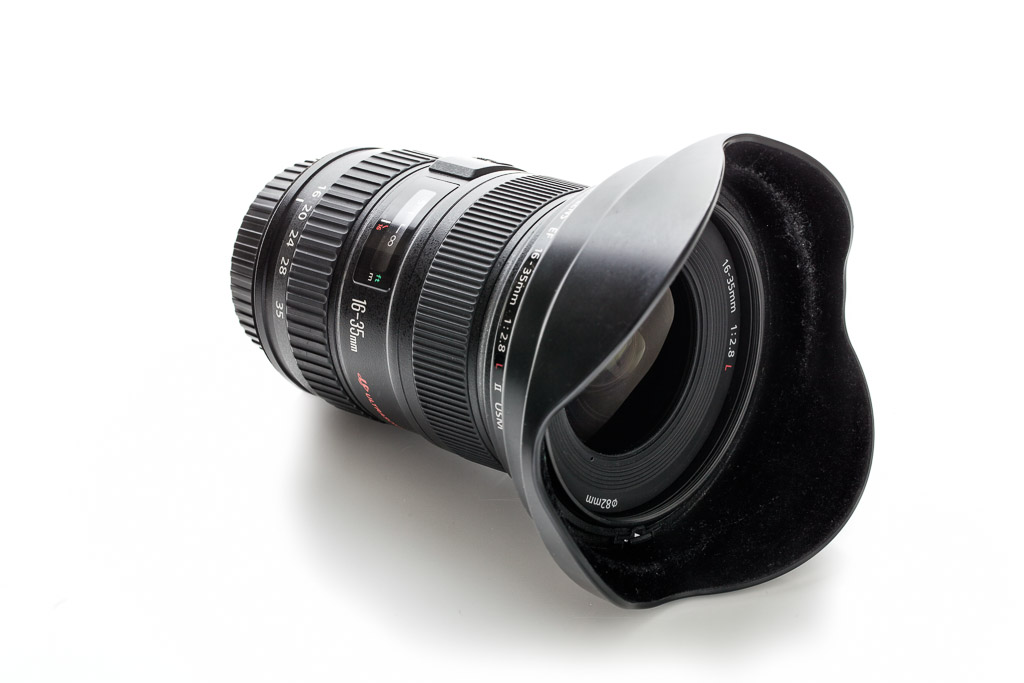
Review – Canon EF 16-35mm f/2.8L II

Review – Canon EF 16-35 f/2.8L II
By: Justin VanLeeuwen 

Wide angle lenses tend to be an essential, if not fairly niche, part of a photographer’s kit. The distortion caused at the extreme edges of the frame can have both a positive and negative effect on the results of an image, and thus should be used sparingly and selectively. Part of the Canon “holy trinity” (complemented by the 24-70 f/2.8 L II, and the 70-200 f/2.8 L IS II) of zooms, the Canon EF 16-35mm f/2.8 L II USM represents the pinnacle of Canon’s wide-angle zooms. For the longest time, I’ve been using a close Canon alternative, the 17-40 f/4 L. At half the price and quite a bit lighter it was actually my very first lens, ever. Obviously I was curious to see if the wider aperture, the slightly wider focal length, the added weight and cost were worth an upgrade from a lens that has worked very well for me up to now.
EF 16-35 f/2.8L II
Canon EF 16-35mm f/2.8L II

Build
While this won’t be a straight compare-and-contrast of the 16-35mm vs. the 17-40mm, I think it’s important to note some of the more stand-out differences. Of course, the first thing I noticed was the weight. At 640 grams, it’s slightly heavier than the 17-40′s 470g. It’s not a huge difference, but remember, I’m incredibly used to the 17-40 so it was noticeable. The added heft does give it a good balance on my 5dMKIII with grip, and it was pleasant to use all day during some events I covered. I’ve mentioned in other reviews that 82mm is the new 77mm and with the 16-35 was the first to introduce that filter size in the lineup. I’m not afraid of using circular polarizers on lenses this wide, though you will have to be careful with what type you choose, as any filter that is too thick will definitely cause vignetting at the corners on a full-frame body at 16mm.
5D Mark III, 16mm, f/6.3, 1/125th ISO 50
The rubber focus and zoom rings were smooth and well-proportioned to the size of the body. Mine was a rental unit but didn’t show any signs of being loose. A rubber gasket at the mount makes this lens weather sealed (though a front filter is required to *fully* weather seal the lens). The 16-35 is built to last and work in the most trying of environments.
Image
The Canon 16-35mm f/2.8 L II is Canon’s flagship full-frame wide-angle zoom. Only the 14mm f/2.8 L is wider and as fast (the Canon 8-15mm fisheye is wider, but the fisheye adds a different level of distortion and it is f/4). As such, we’d expect it to have the best optics Canon has to offer. I found images to be relatively sharp wide-open at the centre (something I cannot say is true for the 17-40 f/4 L) and definitely sharpened when stopped down a stop to f/4. A tricky thing to accomplish with wide-angle lenses is an effectively blurred background as the maximum focus distance is so close (hyperfocal distance can be achieved within 4 feet at about f/6.3). You really need a wide-open aperture and a close subject to be able to create a decent amount of bokeh.
Potential issues with all wide-angle lenses are flaring, softness of image and chromatic aberration (especially at the edges). While I did find some chromatic noise, I found it very well controlled considering the aperture and wide-angle. The lens also didn’t “flare out” like some cheaper glass I’ve used in the past; you can shoot into the light without having to worry too much about loss of contrast. Does it soften at the edges? Yup, but it also distorts heavily, elongating anything along the outer stretches of the lens. Great if that’s an effect you’re going for with sky, or landscape, or even architecture, but less than flattering for faces or features you’d rather see in proportion.
For the first time in a long time I didn’t find lens vignetting to be an issue. It is present, especially at the wider focal length of 16mm and wide-open, but it wasn’t as drastic as many primes and it improved as the lens was stopped down. There was some lens distortion when photographing straight objects but it was not a surprise and it was easily fixed in Adobe Lightroom 4.
Because this is a full-frame compatible lens (as are all “L” series), these factors vary depending on the crop factor of the body of your choice. How wide a wide-angle lens is changes if you’re shooting with an APS-C size sensor at 1.6 crop; where most of the lens faults and flaws are cut-off by your sensor, and your apparent focal length shifts to about 25-56mm. While I no longer use a crop-sensor camera, I did find those focal lengths useful when I did, especially for landscape and interior work. On a full-frame camera the sheer field of view can complicate your compositions, since there is so much to consider in your image.
5D Mark III, 16mm, f/6.3, 1/30th ISO 500
Who’s it for
This lens is a staple for photojournalists and wedding photographers. The fast aperture, great optics, and versatility of a zoom help them create compelling images in the tightest of environments. In a completely arbitrary collection of data, someone took a look at the EXIF information of all the cameras and all the lenses used by Reuters photographers in their “Best photos of the year 2012″ the Canon 16-35mm was, by far, the most used lens in these images. You can draw your own conclusions from this though: http://petapixel.com/2012/12/02/the-most-popular-cameras-and-settings-for-reuters-best-photos-of-the-year-2012/
When carefully wielded, the 16-35 makes a versatile group and environmental portrait lens. Just watch out for those edges of the frame, where distortion and stretching occurs. Keeping your subjects centred will help keep them looking reasonably normal. This is a great way to accentuate foreground objects, while allowing background objects to fade out into the distance.
I prefer to shoot interior photography at 24mm with my 24mm f/3.5 L Tilt-shift lens. I find 16 or 17mm too wide on a full-frame camera to accurately capture a space. The distortion at the edges makes rooms and objects seem much larger than they are, misrepresenting what I’m trying to accomplish. Of course, this can be used to your advantage in creative architectural photography, taking curves and lines and accentuating them.
5D Mark III, 16mm, f/8.0 1/160th ISO 320
Some landscape shooters may find the 16-35mm a versatile lens for outdoors, as Canon has not yet made a 14-24mm equivalent like Nikon has. It’s likely their best bet for ultra-wide angle shots. Like I noted with architecture above, it’s a matter of taste if you like the distortion that comes with 16mm. I should also mention that the 17-40 f/4L will perform just as well when stopped down to equivalent narrow apertures often used in landscape photography. If you’re shooting at f/11 I’d say the 17-40 is the smarter choice.
Conclusion
The 16-35mm f/2.8 L II beats my 17-40 f/4L in all aspects hands-down, except for cost. While I won’t find myself making the upgrade anytime soon, I did find the superior optics and faster aperture a boon in many situations I was in while working with the 16-35. The weight difference became less significant, and I actually mistook one lens for the other while packing my kit one day. I don’t always use a wide-angle lens and it’s use to capture more elements in a scene can be subjective. If you’re shooting on a crop sensor body and plan on making the switch to full-frame someday, you’ll definitely get a lot of value out of this lens moving into the future. Full-frame users who may be used to their “kit” 24-105 or 24-70 may want to rent or try the 16-35mm before they purchase it, since this level of ultra-wide-angle can be a shock for some first-timers. If cost is a factor I do suggest having a look at the 17-40 f/4L, while it distorts a bit more, is soft-wide open, and doesn’t have as shallow an aperture, it’s served me well from the very first shot I took with my digital Rebel XT.
5D Mark III, 18mm, f/4.0 1/25th ISO 1600
Pros
  • Wide-open fast aperture to capture more light & blur out backgrounds
  • Wide angle to exaggerate foreground elements
  • Great Optics across the focal range
  • Excellent wide-angle for both crop-sensor and full-frame bodies

Cons
  • Twice as expensive as Canon’s 17-40 f/4L (but with twice the “value” I suppose)
  • No Image Stabilization. Is that an issue for such a wide-lens? Nikon users have it, so heavy-coffee drinkers like me want it too!

sabato 1 giugno 2013

The Lowdown on the SpinLight 360® Modifiers – by Yishai Shapir

Yishai Shapir is a visual storyteller and photographer who is passionate about learning and sharing his knowledge about photography, video, computer hardware and software. He fell in love with photography twenty-two years ago when his son was born and started his career in special effects, founding a 3D animation & hardware company in Los Angeles called Motion Media. Yishai applied his vast technical knowledge and fascination with photography into inventing the innovative SpinLight 360® Modular System.
SpinLight 360 Modifiers

The Full White Dome vs. The Clear Dome

The main differences between the white dome and the clear dome (without bounce cards) are:
• The white dome will produce softer light than the clear dome.
• The white dome will block about 1-1.25 stops of the flash power.
• The clear dome will block about .25 stop of the flash power.
• The clear dome is more efficient than the white dome, requiring less flash power, which is beneficial when you need faster recycling speed.
• The white dome will attenuate the light from the center to the edges faster compared to the clear dome (see image below).
• The clear dome will evenly illuminate a larger area.
SpinLight 360 Modifiers
TIP: When shooting a large group where you need to spread the light as evenly and as widely as possible, we recommend using the clear dome, either with or without the white card, while tilting the flash slightly forward, not in the absolute straight-up position.
SpinLight360 Modifiers
When you use the flash head in the upright position with the SpinLight 360® and just a white bounce card (no modifier), most of the flash light will go straight up.  One of the advantages of the white and clear domes is that they spread the light as soon as it comes out of the flash tube onto the surface of the card, forcing more light to bounce against the card, which results in more light bouncing forward toward the subject.
SpinLight360 Modifiers
The image below was shot during the late afternoon, with a white card and the clear dome while the flash was in the upright position, at -1 flash compensation to enhance the skin tone and texture.  This resulted in a beautiful image that looked naturally lit.
SpinLight360 Modifiers

The Half Dome

The half-dome modifier is opaque so no direct flash will hit the subject.  Aiming the opening of the half-dome toward the card will force the light to hit the card, as well as the ceiling, and bounce the light forward toward the subject. We recommend using the half-dome outside or when you are in a location with no place to bounce.
SpinLight360 Modifiers
Another creative use of the half-dome is to rotate the opening of the half-dome toward the subject and use it as a gradual filter.  Using it this way will allow light to hit the subject directly from the dome opening, and block the light from the remaining area, creating a vignette in the location where the opaque part of the dome sits.  For instance, the half-dome was situated with the opening on top and the opaque part on the bottom, resulting in the vignette on the bottom as shown in the photo below.
SpinLight360 Modifiers

The Snoot

When using the snoot it’s important to understand the light pattern that comes out and hits the subject.  The shape of the light coming out of the snoot resembles more of a capsule shape than a circular one.  The orientation of the flash towards the subject will dictate the shape’s direction as demonstrated in the images below.
SpinLight360 Modifiers
This image was shot with the snoot and the flash opening pointed horizontally towards the subject.  As you can see in the image below, the light shape is horizontally elongated.  Another creative use of the snoot is to use it for accent lighting, strip lighting or side lighting for a portrait, mimicking a long narrow light source.
SpinLight360 Modifiers

The Grids

As you see in the image below the differences between the Black and White Grids are that the white grid has softer, feathered edges, while the black grid has harder edges, and the white grid loses about 1 stop of light compared to the black grid.
SpinLight360 Modifiers
Here are some examples of photos shot with white and black grids. The first image was taken with the white grid.  As you can see, the light attenuates from the center to the edges gradually.
SpinLight360 Modifiers
This image was shot with the black grid at the same setting as the previous image, without compensating for the additional stop of power.  As you can see in the image below, it’s overexposed by 1 stop.
SpinLight360 Modifiers
This image was shot with the black grid.  As you can see, the light attenuates more harshly towards the edges, creating more of a distinctive vignette.
SpinLight360 Modifiers
We recommend using the grids for a hairlight or if you want to call attention to the center of your image.
TIP: Keep in mind that all of the modifiers can be used with a gel at the same time.
TIP: Compensating the flash power depends on your flash manufacturer, and can range from -3 stops underexposed to +3 stops overexposed.  When the flash is “correctly” exposed according to the camera metering, especially in ETTL or a like mode, it does not necessarily mean you will get the desired result.  You must experiment, both under- and overexposing your flash power.  You will be surprised by the differences, especially when bouncing the flash.

venerdì 31 maggio 2013

Video: How Carl Zeiss’ New Touit Lenses Are Manufactured


There’s something to be said about lens manufacturing. You could even go so far as to say it, in itself, is an art form, with the hands of skilled and methodical workers ever-so-delicately assembling the glass we use to take photos. Speaking of lens manufacturing, Carl Zeiss Lenses has just posted an short, yet interesting, video behind the manufacturing process of their Touit lens line (for what it’s worth, the video is also available in 3D, if you need an added dimension to your viewing experience). These lenses come as 12mm f/2.8 or 32mm f/1.8, and are available for both E-mount and X-mount cameras starting in June. Video: How Carl Zeiss New Touit Lenses Are Manufactured Carl Zeiss Touit Manufacturing The manufacturing process behind the Touit line, like any lens line, is complex. Sixteen different types of glass make up each lens, and if that’s not enough to impress you, each lens is composed of about one hundred parts each. Once assembled, the lenses are subject to excruciating individual testing, which includes sixty steps of quality control. This, of course, is Carl Zeiss we’re talking about here, so you know you’re going to get a great, long-lasting product. That Zeiss quality is proved with a test certificate before it’s all packaged up and ready to be shipped off to a customer. Having watched this, you may just have your answer the next time you ask: “Why are Zeiss lenses so expensive?”

Samyang 16mm f/2 ED AS UMC CS

News image

Via its Facebook fan page, Samyang Asia has announced the upcoming launch of a 24mm equivalent rectilinear lens for dSLRs and CSCs with APS-C sized sensors. The new Samyang 16mm f/2.0 ED AS UMC CS is a manual-focus lens featuring 13 elements arranged in 11 groups and a 77mm filter thread. Weighing in at 571g, the Samyang 16mm f/2 ED AS UMC CS will be available in Canon EF, Canon EF-M, Four Thirds, Micro Four Thirds, Fuji X, Nikon F, Pentax, Samsung NX, Sony A and Sony E mounts. Note that on Canon and - especially - Four Thirds and Micro Four Thirds bodies, the lens will have a tighter field of view (~26mm equivalent on Canon and 32mm on [M]FT). Pricing has yet to be communicated.

5D Mark III & RAW Video, A Case Study


Magic Lantern is onto something… There have been a lot of posts lately about Magic Lantern’s breakthrough enabling RAW video recording on the Canon EOS 5D Mark III. Below is an ISO test of the standard H.264 of the 5D3, and what the RAW video from Magic Lantern looks like. This was done by Dustin J Tolman. The results are pretty remarkable and easy to see, this software is still in its early stages and will probably get a lot better over the next few months. Workflow An ISO test comparing Canons H264 compression vs Magic Lantern’s 14 Bit RAW hack. • First I converted the RAW files with ML’s raw2dng. • Next I dragged the files into Photoshop which opened up Adobe Camera Raw. • I selected the first image and used the auto white balance setting which got rid of the heavy magenta tone. • Then I synchronized the additional files, and exported them as 16bit tiff files. • First I tried to use QuickTime 7 to create an image sequence, but it render the video with incorrect color. • So instead of QT I ended up using Final Cut Pro X to create an image sequence to a ProRes 422 HQ output. Canon 5dmk3 @ F8 Canon 70-200 2.8L IS II @ 200mm Technicolor Cinestyle Music – Soundgiant

giovedì 30 maggio 2013

Firmware Canon EOS-1D X

Firmware Canon EOS-1D X
Version 1.2.4
Firmware Version 1.2.4 incorporates the following functional improvements and fixes:
  1. Improves the speed of the camera’s acquisition of focus when using a Canon Speedlite’s AF-assist beam.
  2. Reduces the time it takes to display the metering result on the LCD or Viewfinder when the meter has been activated.
  3. Fixes a phenomenon in which a “Caution 02” message is unnecessarily recorded in the camera status log.
  4. Fixes a phenomenon in which continuous shooting pauses when using a Canon Speedlite.
  5. Fixes a phenomenon, when the Canon GP-E1 is attached, in which the GPS device settings are reset to default settings when the camera has been powered off
Note:
*This phenomenon occurs only with firmware Ver. 1.2.1.
*After changing the GPS device settings, please be sure to power off the camera before removing the battery. This will ensure that the camera’s GPS device settings will be saved.

Firmware Version 1.2.4 is for cameras with firmware version 1.2.1 or earlier. If your camera’s firmware is already Version 1.2.4, it is not necessary to update the firmware. When updating your camera’s firmware, please review the instructions thoroughly before you update the firmware. The firmware update takes approximately seven minutes.
DOWNLOAD FIRMWARE

mercoledì 29 maggio 2013

Fujifilm X-E1 Firmware Update 1.05

News image
Fuji has posted a firmware update for the Fujifilm X-E1 compact system camera. Version 1.05 improves auto focus speed with the XF55-200mmF3.5-4.8 R LM OIS lens. You can download the firmware upgrade from the website below.

Fujifilm X-Pro1 Firmware Update 2.04

News image
Fujifilm has issued a firmware update for the Fujifilm X-Pro1 compact system camera. Version 2.04 improves auto focus speed with the XF55-200mmF3.5-4.8 R LM OIS lens. You can download the firmware upgrade from the website below.

Nikon Coolpix P7700 Firmware Update 1.2

News image
Nikon has released a firmware update for its Coolpix P7700 digital compact camera. According to the company, Version 1.02 fixes the following bugs:
"When shooting with shooting mode set to M (manual), ISO sensitivity set to Auto, ISO 80-200, ISO 80-400, or ISO 80-800 and the flash used, ISO sensitivity was sometimes not locked at ISO 80 and a different ISO sensitivity was sometimes applied."

lunedì 27 maggio 2013

A Cinema Camera for $500: Magic Lantern Unlocks RAW Video in the Old Canon 50D


A Cinema Camera for $500: Magic Lantern Unlocks RAW Video in the Old Canon 50D canon50d
The Magic Lantern team deserve some sort of award … or a ribbon … or at the very least a hug. That’s because, lately, they’ve been making ground-breaking RAW video announcements almost weekly. From the very beginning of the story — when they discovered a RAW DNG output in live view — to the breakthrough when they began pulling in that stream at 24fps and full 1080p HD, it’s been nothing but good news out of the Magic Lantern camp.
But get ready, because the celebration is only just beginning. Before now, taking advantage of Magic Lantern’s RAW video capability would have required you to have a 5D Mark III or II, but EOSHD forum user Julian Huijbregts has demonstrated that the same is now possible out of Canon’s 5-Year-Old $500 50D!
No, you didn’t read that wrong. For under $500 on eBay, you can now purchase what amounts to a Canon Cinema Camera that can shoot RAW video nearing 1080p full HD resolution. The software is very early in development, so improvements are bound to surface, but for now Huijbregts was able to shoot resolutions as high as 1592×720 at 24fps with no frame skipping using a SanDisk 32GB 95MB/s card:

As it turns out, the 50D — which was released at the same time as the 5D Mark II — has always had video capability, it was just locked out in firmware. Additionally, because it came out before the pixel war really took effect, its 15-megapixel sensor performs extremely well in low-light. Couple that with the fact that it comes equipped with a UDMA 6 CF card slot for high transfer rates, a large buffer and a more professional-style build than its successor, the 60D, and it almost seems like this kind of high-end video is what the 50D was born to do. If you don’t mind skipped frames after the first 50, the current ML build can push the 50D to collect 24p RAW video at up to 1592 × 1062. Given some time (and, at this rate, not that much of it) the team will very likely manage to push RAW video on this extremely cheap APS-C cam to 1080p full HD. That’s all we know for now. To see all of Huijbregts’ results — including an anamorphic test, original DNG files, moire test and sample videos processed in Magic Lantern’s RAW mode — click here to download his full 50D sample pack. (via EOSHD)

Will Third Party Firmware Void Your Canon Warranty?

Will Third Party Firmware Void Your Canon Warranty?
Are you covered if you use Magic Lantern?
DIY Photography did a great article on third party firmware and whether or not it voids your warranty. They did it for various brands including Canon, Nikon and Panasonic. Of the three, only Canon is “okay” with you using third party firmware and your warranty will not be “voided”. The only catch is if you “brick” the camera and it’s related to third party software, Canon will not cover that repair.
Canon’s Response
“There is no such thing as “voiding” the Canon warranty, there are simply repairs that are covered, and those that are not.
For instance, the repairs for a failure of the buttons on the back of the camera within the warranty period, on a camera that does not show any evidence of mishandling or misuse, would likely be covered. Repairs for a camera that is “bricked” or otherwise having issues directly related to using a third party firmware would not be covered.”
EOS-1 Bodies
Canon doesn’t mention anything about EOS-1 bodies and third party firmware in the above story. However, I have been told Canon would take legal action against anyone publicly releasing unauthorized firmware for the EOS-1 bodies, so this is probably why we haven’t seen any development of such software.
You can read the entire article at DIY Photographer

venerdì 24 maggio 2013

Adorama Flashpoint 180 Monolight and Battery Kit

News image
Adorama has begun selling the new Flashpoint 180 Monolight Kit. Compact and ideal for on-location shooting, the Flashpoint 180 Monolight includes a Flashpoint 180 Monolight with reflector, Bowens-compatible mount and handle, two NP-F960 batteries with a charger, a small umbrella, sync cords and a carrying bag. The Flashpoint 180 Monolight Kit is available now for $199.95 (regularly $249.95).
Adorama Press Release
Adorama Introduces the Flashpoint 180 Monolight and Battery Kit
The professional all-in-one lighting kit now available at the special price of $199.95 for a limited time only
New York, NY – May 20, 2013 – Adorama, one of the world’s largest photography, imaging, video and electronics retailers, and a leading destination for iPhone photo specialty accessories, is now selling the new Flashpoint 180 Monolight Kit. The Flashpoint 180 Monolight is compact and ideal for on-location shooting. Lightweight and versatile, the complete lighting kit comes pre-loaded with all the accessories needed to achieve the perfect lighting for any shoot, including a case to carry it all. Two readily available NP-F960 batteries power the light, providing up to 700 flashes at a full 180w/s and giving photographers ultimate control for all of their lighting needs. The Bowens-compatible mount enables the use of advanced light modifiers, such as beauty dishes, while the Flashpoint Bowens Speed Ring Adapter allows the use of soft boxes and other lighting accessories to help deliver flawless results.
The Flashpoint 180 Monolight Kit Ships With:
• Flashpoint 180 Monolight with reflector and handle
• Batteries and charger
• Small umbrella
• Cords
• Carrying bag
Visit the Adorama Learning Center to learn more about monolights, explore the meaning of watt-seconds, and find out how the right light can transform a photograph.
Special Pricing and Availability
The Flashpoint 180 Monolight Kit is available now for 199.95 USD (regularly 249.95 USD) and ships for free (7-10 day delivery) when ordered online at http://www.adorama.com The k.it is also available at the Adorama superstore located at 42 West 18th Street New York, NY 10011.
Flashpoint is Adorama’s in-house brand, featuring high-quality photo and video accessories and gear, such as the Flashpoint 180 Monolight Kit, at price points lower than competing name brands such as Profoto and Smith Victor.
ABOUT ADORAMA
ADORAMA: More Than a Camera Store
Adorama is more than a camera store – it’s one of the world’s largest photography, imaging and electronics retailers. Serving customers for more than 30 years, Adorama has grown from its flagship NYC store to include the leading online destination for photography, imaging and consumer electronics. Adorama's vast product offerings encompass home entertainment, mobile computing, and professional video and audio, while its services include an in-house photo lab, AdoramaPix, pro equipment rental at Adorama Rental Company and the award-winning Adorama Learning Center, which offers free education for photographers in video channels such as the popular AdoramaTV.
Adorama is listed as Forbes.com’s "Best of the Web" and in the Internet Retailers Top 100, and is the official Photo and Electronics Retailer of the NY Giants.
Visit ADORAMA at http://www.adorama.com

Xara Photo & Graphic Designer 9

News image
Xara has released version 9 of its Windows-based creative design software, Xara Photo and Graphics Designer. New features include an advanced healing brush, 11 new photo effects, Google font support, new masking and selection tools, advanced background erasing options and more. Xara Photo & Graphic Designer 9 costs £69.99.
Xara Press Release

New Xara Photo & Graphic Designer v9
21st May, 2012 - Xara today announced the release of the latest new version of their creative design software, Xara Photo and Graphics Designer v9.

Xara Photo & Graphic Designer is ideal for any graphics enthusiast, small company or academic user that requires the best value general purpose photo and graphic design tool.
The headline new features include:
Advanced Healing Brush – remove blemishes with a single click, or brush over an area to erase it.

New Mask and Selection tools.  Easily paint, or draw a region or area to enhance, such as adjust the brightness, sharpness, color temperature etc.
Advanced background erase. Extract complex shapes such a people or objects in the foreground, and place them on alternate backgrounds.
Drag and drop re-colouring of clipart and vector groups.
Google Font support. Browse, preview and install any of the 600+ Google Fonts.  Although Google Fonts were primarily designed to be web fonts, they are open source Truetype or OpenType fonts and Xara has built in a way to automatically download and install the font as a Windows font.
11 new Photo Effects including Fake HDR, Polarized Grayscale and Color Splash to highlight a color.

New clipart including a wide range of ‘company logo’ designs
Most of Xara's photo editing tools are non-destructive. Also known as 'parametric image editing', this non-destructive technique allows you to adjust or even remove edits at any point in the future, without affecting the original image. Photo edits are stored as the parameters to be changed (such as brightness or blend levels) rather than the altered pixels.  This is much faster, more powerful, more memory efficient, and allows near infinite Undo.

Xara Photo and Graphic Designer introduces some really advanced photo editing features. An automatic background erase that normally takes hours of careful manual masking (or would be impossible), can be done in seconds. The Healing Brush is built on what Xara believe to be the most advanced intelligent 'fill in' algorithms anywhere. The new Mask and Selection tools make it easier than ever to apply edits to specific areas, and to have those edits seamlessly blended into your photo.
Charles Moir, Managing Director of Xara said: "As the name suggests 'Photo & Graphic Designer' is more than just another photo editor. It's one of the most advanced and powerful vector graphics programs available, and seamlessly combines all the photo editing features you're likely to need. Why should you have to use one program for general vector 'artwork' style graphics and another for photo editing, when you can get one, really fast, really easy-to-use graphics program that does it all? It's simply the most advanced photo and graphics editing tool available, for the money."

Xara Photo & Graphic Designer 9 costs just £69.99 (inc VAT)

Upgrades from v8 to Xara Photo & Graphic Designer 9 cost £35 (inc VAT)
It operates on Windows XP/Vista/7/8
For more information see  - xara.com
Demonstration pages of the new features - xaragroup.magix.net/PGD9Demo1/

Corel Launches Special Pricing Programme for Creative Suite Users

News image
Corel today announced a special pricing programme specifically for Creative Suite users looking for an alternative to Creative Cloud. CS users residing in North America can purchase CorelDRAW Graphics Suite, Painter, PaintShop Pro, VideoStudio Pro and AfterShot Pro at a special price (ranging up to 60% off the suggested retail price) until 30 August 2013. To experiment with the tools, features and workflow of Corel products, free 30-day fully functional trials can be downloaded from the website below.
Website: Corel
Corel Press Release
Corel Offers Powerful Alternatives to Creative Cloud
Creative Suite Users Looking for Options Can Benefit From Special Pricing
Maidenhead, UK – Wednesday 22 May, 2013 – Corel today announced a special pricing program specifically for Creative Suite users looking for an alternative to Creative Cloud. As some software companies move to subscription only models, Corel continues to offer users the flexibility to choose how they want to purchase and experience Corel products. Creative Suite users are invited to try or purchase award-winning Corel software including CorelDRAW Graphics Suite, Painter, PaintShop Pro, VideoStudio Pro and AfterShot Pro at a special price (ranging up to 60% off SRP).
“We strongly believe that users should be able to choose how they would like to purchase their software,” said Nick Davies, EVP & GM Graphics, Digital Media & Productivity Software at Corel. “We recognise that there isn’t one solution that will work for everyone, which is why we have different offerings for the diverse products in our portfolio. We will continue to sell perpetual licenses in both the box and download format, in addition to offering CorelDRAW subscriptions and more, in order to meet the needs of our users.”
Corel Offers Best of Both Worlds
Whether users are looking for a short-term commitment or want to always be up-to-date but own their software, Corel delivers the options and flexibility to cater to diverse users. In addition to a subscription or perpetual license of CorelDRAW® Graphics Suite, the CorelDRAW Premium Membership program adds the benefits of a subscription (always up-to-date, exclusive content and more) to the perpetual usage right of the product, offering the best of both worlds.
Take Corel Products for a Test Run
To experiment with the tools, features and workflow of Corel products, free 30-day fully functional trials can be downloaded at http://www.corel.com/cs Learning resources are available within the product and through the Corel Discovery Center to ease into the transition and become more familiar with the power of Corel products.
“I'm a graphic designer by trade and I've tried just about every professional design application out there, but CorelDRAW Graphics Suite X6 trumps them all” said Scott Huff, CorelDRAW user. “The streamlined interface is highly customisable with dockers and tools that are useful and intuitive. The integration within the applications means I never need to leave my Corel environment. From initial sketches to final proof I complete my work in a fraction of the time it takes using the competition's top tools.”
Pricing
The following offer is available for Creative Suite users in North America until August 30, 2013:
CorelDRAW® Graphics Suite X6 – £215 (SRP £479)
Painter® 12 – £143 (SRP £275)
PaintShop® Pro X5 – £44.99 (SRP £59.99)
VideoStudio® Pro X6 – £44.99 (SRP £59.99)
AfterShot™ Pro – £59.99 (SRP £80)
To learn more about the special offer or to purchase, visit http://www.corel.com/cs
.
Join the Corel Community
Connect with us on Facebook at http://www.facebook.com/corel
Follow us on Twitter at @corelsoftware
Share with us on Pinterest at http://www.pinterest.com/corelsoftware
Read our blog at http://www.corel.com/blog

About Corel
Corel is one of the world's top software companies providing some of the industry's best-known brands, including Corel®, Roxio®, Pinnacle™ and WinZip®. Boasting the most comprehensive portfolio of graphics, productivity and digital media products, we've built a reputation for delivering innovative software that’s easy to learn and use, helping people achieve new levels of creativity and productivity. The industry has responded with hundreds of awards for innovation, design and value.
Used by millions of people around the world, our product lines include CorelDRAW® Graphics Suite, Corel® Painter®, Corel® PaintShop® Pro, Corel® VideoStudio®, Corel® WordPerfect® Office, Pinnacle Studio™, Roxio Creator®, Roxio® Toast® and WinZip®. For more information on Corel, please visit http://www.corel.com
.
© 2013 Corel Corporation. All rights reserved. Corel, the Corel logo, the Corel Balloon logo, CorelDRAW, PaintShop, Painter, Pinnacle, Roxio, Roxio Creator, Toast, VideoStudio and WordPerfect are trademarks or registered trademarks of Corel Corporation and/or its subsidiaries. WinZip is a registered trademark of WinZip International LLC. All other names and any registered and unregistered trademarks mentioned are used for identification purposes only and remain the exclusive property of their respective owners.

Photodex Sports & Action Effects Pack for ProShow

News image
Photodex have released their new Sports & Action Effects Pack for ProShow. The pack includes a dynamic array of "sporty" transitions, edgy photo layouts and titles, and digital 'player stats' cards, ideal for photographers covering an end of season wrap-up, a game victory, or team portrait showcase. "From sports photographers to proud parents on the sidelines, more and more digital photos and videos are being captured at sporting events", said Paul Schmidt president and founder of Photodex. "ProShow makes it easy to turn those digital files into shareable memories. Our new Sports & Action effects pack offers up some fun and energetic animations that can really amp-up sports slideshows." The Photodex Sports & Action Effects Pack is available now for $19.95.
Photodex Press Release
Photodex Releases New Sports & Action Effects Pack for ProShow
Austin, TX, May 21, 2013 - Photodex today announced the release of their new Sports & Action Effects Pack for ProShow, an award-winning slideshow tool that lets people easily combine photos, video clips and music into a polished video.
The first of its kind, the Sports & Action Effects Pack stacks its lineup with a combination of slide styles and transitions, offering a well-rounded powerhouse of premium effects for sports slideshows. The pack includes a dynamic array of sporty transitions, edgy photo layouts and titles, and digital 'player stats' cards, ideal for photographers covering an end of season wrap-up, a game victory, or team portrait showcase.
Unique to this Effects Pack is the option for users to customize the colors for select slide styles to coordinate with their team's colors. Also included are digital 'player stats', reminiscent of old school trading cards, that can be customized to profile an individual athlete or team. The stats include editable fields for player and team names, position, coach, hometown and more. The Sports & Action Effects Pack covers 15 major competitive athletic and performance categories.
"From sports photographers to proud parents on the sidelines, more and more digital photos and videos are being captured at sporting events", said Paul Schmidt president and founder of Photodex Corporation. "ProShow makes it easy to turn those digital files into shareable memories. Our new Sports & Action effects pack offers up some fun and energetic animations that can really amp-up sports slideshows."
Pricing and Availablity
The Sports & Action Effects Pack is available now for $19.95. Available for download or on disc from http://www.photodex.com or by calling 1-800-37-PHOTO (1-800-377-4686). Requires ProShow Gold 5, ProShow Producer 5 or ProShow Web.

venerdì 17 maggio 2013

Rogue FlashBender XL Pro Lighting Kit Now Available in US

News image
ExpoImaging has announced the US availability of the Rogue FlashBender XL Pro Lighting Kit. The kit includes a FlashBender XL Pro white reflector, an XL Pro Strip box diffuser, an XL Soft Box diffuser and a reversible XL Pro silver/black reflector. The Rogue XL Pro Lighting Kit is available to buy now, at a guide retail price of $99.95.
Website: ExpoImaging
Press Release
Introducing Rogue FlashBender XL PRO Lighting Kit: Portable Light Modifiers Include Strip Box, Soft Box, and Shapeable Reflector for Speedlight Photography

Rogue Photographic Design delivers new Portable Lighting Kit for Speedlights, includes quick change diffusers to create Strip Box, Soft Box, or White / Black / Silver Reflector.
Watsonville, California (PRWEB) May 14, 2013
ExpoImaging, Inc., which markets, designs, manufactures and distributes innovative camera accessories to the photographic market, today announced availability of the Rogue FlashBender XL Pro Lighting Kit for small strobe lighting enthusiasts.

“Photographers using and traveling with speedlights are always looking for ways to do more with less,” said Erik Sowder, CEO of ExpoImaging, Inc. “The new FlashBender XL Pro reflector is larger than anything we’ve designed before and ideally suited for on location off-camera lighting. Included in the kit is a new variable-width strip box diffuser attachment that introduces an entirely new edge lighting tool to the Rogue system.”

“Like our other Rogue FlashBenders, this compact, durable system of flash modifiers packs flat. It’s sized to fit in the most popular roller bags, or into a 17” laptop compartment,” said Sowder.

In studio or on location, the Rogue FlashBender XL Pro Lighting Kit provides more creative lighting control for photographers using small flash. The included quick change attachments make a variable width strip box for background, rim and edge lighting control, a low profile soft box for soft directional light, or a multi-surface white, black, or silver reflector to manipulate contrast.

The Rogue FlashBender XL Pro Lighting Kit includes: Rogue FlashBender XL Pro Reflector, Rogue XL Pro Strip Box Attachment, Rogue XL Pro Soft Box Attachment, Rogue XL Pro Reversible Silver-Black Attachment. Like all FlashBenders, the integrated attachment strap fits all popular brands of shoe mounted flashes.

Pricing and Availability
The Rogue FlashBender XL Pro Lighting Kit is available now through ExpoImaging’s distribution partners worldwide, or online at http://www.expoimaging.com The R.ogue FlashBender XL Pro Lighting Kit retails for $99.95.

About Rogue Photographic Design
Created by ExpoImaging, Rogue Photographic Design is a growing line of innovative lighting equipment for speedlight enthusiasts. Compact, versatile, and durable, patented Rogue light modifiers offer unparalleled lighting control and creative possibility in a minimum amount of space. More information about offerings from Rogue Photographic Design is available at http://www.expoimaging.com
.
About ExpoImaging, Inc.
ExpoImaging, Inc. markets, designs, manufactures and distributes innovative camera accessories to the photographic market. ExpoImaging is the pioneer in white balance filters and manufactures ExpoDisc White Balance Filters, Rogue FlashBenders, Rogue Diffusion Panels, Rogue Grid, Rogue Flash Gels, and the ExpoAperture2 Depth-of-Field Guide. ExpoImaging is also the exclusive U.S. distributor of Ray Flash: The Ring Light Adapter. These unique products are available at select photography dealers worldwide or online at http://www.expoimaging.com
.
Included in the Kit:
1x XL Pro FlashBender White Reflector
1x XL Pro Strip Box Diffuser Attachment
1x XL Pro Soft Box Diffuser Attachment
1x XL Pro Silver/Black Reflector Attachment

Logistics Manager 30

News image
Think Tank Photo has released its newest rolling camera bag, the Logisitcs Manager 30. A new version of the company's popular large-capacity roller bag, the Logisitics Manager 30 holds multiple combinations of cameras and lenses, lighting gear such as strobes and reflectors, and accessories of all kinds. The internal dimensions are 35x70 x21–25.5cm, and the bag also has both internal and side pockets - as well as a large front organiser pocket - for various items. The Think Tank Photo Logistics Manager 30 is available for $499.75 via the website below.
Website: Think Tank Photo
Think Tank Photo Press Release
Think Tank Photo’s Releases Logistics Manager™ 30 Large Capacity Rolling Camera Bag
Santa Rosa, Calif. – Think Tank Photo announces the release of a new version of its popular large capacity rolling camera bag, the Logistics Manager™ 30.  The rolling case’s endless interior layout options adapt to numerous equipment combinations and help manage all of the logistics of transporting and using a lot of gear while on location.

Its roomy internal dimensions of 13.75”W x 27.5”H x 8.25 – 10”D (35 x 70 x 21 – 25.5cm) allow it to hold multiple combinations of cameras and lenses, lighting gear such as strobes and reflectors, and accessories of all kinds. 

Key Features
Holds and transports all types of gear on location.
Organizer side pocket for various equipment.
Interior pockets for extra organization.
Two clear accessory bags included for miscellaneous items.
Quickly deployable roller handle.
Large front organizer pocket.
Expandable front pocket for large items.
TSA-approved main zipper lock for added security.
Tripod cup, strap, and rain cover included.
“The Logistics Manager 30 answers a question often asked by working photographers: ‘How can I transport all of my gear into the field, have quick access to it, and secure it from loss or theft?’” said Doug Murdoch, Think Tank Photo president and lead designer.  “We took the design and engineering principles we pioneered in our line-up of award-winning rolling camera bags and applied them to this very roomy pro photographer logistics solution.”
Specifications
Internal Dimensions:  13.75”W x 27.5”H x 8.25 – 10”D (35 x 70 x 21 – 25.5cm)
External Dimensions:  15.75”W x 30”H x 11.5”D (40 x 76 x 29cm)
Weight:  16 – 20 lbs (7.3 – 9.1 kg) (depending on accessories used)